Free Tower Rush Play in Demo Mode
By Elena Vance · Updated

Demo with 100,000 Fun credits
The rules match real mode. Fun has no cash value.
Tower Rush free demo opens without registration after a click and starts with 100,000 Fun credits. I checked its Rules screen and BUILD and CASHOUT controls on a phone and laptop; Fun credits have no cash value and do not show operator payouts.
Tower Rush free demo
The demo loads from the Galaxsys server only after a click. Fun credits have no cash value. 18+.
Can you open the Tower Rush free demo without registration?
Yes: the demo starts with 100,000 Fun credits and does not require registration. The game has no separate player account; sign-in and account creation happen at an operator, not inside Tower Rush.
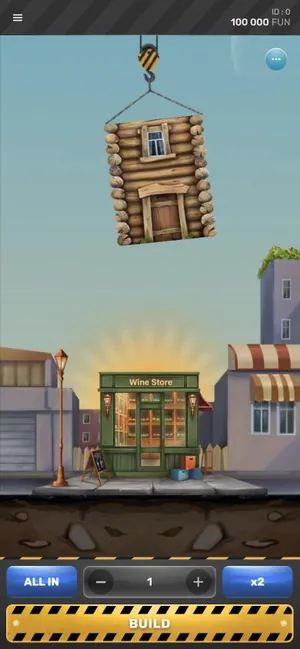
The demo panel loads after you select its play control. You can choose a stake from 1 to 100 Fun, then use minus, plus, ALL IN or x2 before BUILD. A demo account is not needed to try these controls.
What can you test with Fun credits?
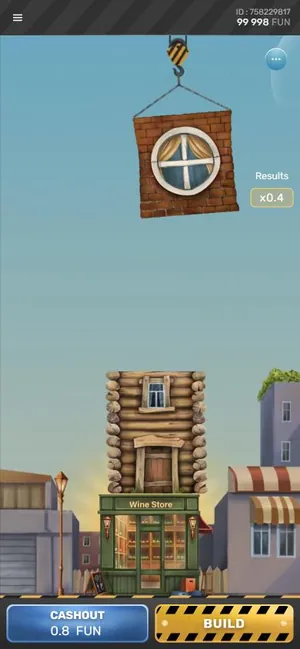
The BUILD and CASHOUT buttons show how each round changes the accumulated odds and balance. A placed floor can raise or lower the total, because floor odds can be below x1.
| Demo item | What it means |
|---|---|
| Starting balance | 100,000 Fun credits, with no cash value |
| Stake range | 1 to 100 Fun per round |
| BUILD | Adds a floor and its odds to the round |
| CASHOUT | Pays the bet multiplied by accumulated odds |
| Max Win | 10,000 Fun, equal to 100x the bet |
A falling floor ends the round and loses the bet unless a Frozen Floor has locked an amount. Once the game reaches Max Win, the amount stops growing, and building further can lose it. The game rules and bonus floors explain these mechanics in more detail.
Bonus floors look ordinary until they land, and Galaxsys does not publish how often they appear. The demo Rules menu also explains that a Frozen Floor locks the accumulated amount once per round; that sum can still be below the original bet.

Frozen, Temple and Triple Build
Each looks like a normal floor until it lands.
How does a Tower Rush demo run on mobile?
On a phone, the demo runs in a mobile browser or inside an operator's app. It is an HTML5 game, and Galaxsys does not publish a standalone Tower Rush app.
In my test, the demo opened on a Samsung Galaxy S24 Ultra and a Dell XPS 15. The controls include BUILD, followed by CASHOUT and BUILD after a floor lands; the menu contains Home, Sound and Rules. Mobile browser and APK safety covers how to distinguish browser play from files that do not come from Galaxsys.
My earlier demo log recorded a mobile round with a 3 Fun bet, a first-floor multiplier of x1.3 and a 3.9 Fun CASHOUT. A desktop session used a 5 Fun bet and six floors before CASHOUT at 10.07 Fun. These are demo examples only, not evidence of real-money returns.
What changes in demo vs real money?
When the mode changes, the game rules remain the same, but Fun credits still have no cash value. In real mode, deposits, operator bonuses and withdrawals exist through the operator, not through the game itself.
The Galaxsys game card lists RTP as 96.2-97.6%; the figure at a casino depends on the version and the operator settings. A demo session does not establish RTP, bonus-floor frequency or real-money payouts. Cashout and withdrawal details explains which steps belong to an operator.
| Check | Demo mode | Real mode at an operator |
|---|---|---|
| Credits | Fun credits, no cash value | Operator balance and payment methods |
| Registration | Not required for the demo | Operator account required |
| Bonus or withdrawal | Not available in the game demo | Operator terms and cashier apply |
The operator sets payment methods and limits, and may ask for identity documents before a withdrawal. The operator promotion page lists current offers and their wagering terms. Operator sign-up steps and operator login help cover those separate account flows.
Similar games in the lobby






How to start a Tower Rush demo play session
Use the Rules menu before BUILD if you want to read the round conditions first. My check covered the demo opening, controls and Rules screen on mobile and desktop; I did not deposit, withdraw or play for money. Elena Vance's test method describes the review process.
- Open the free demo and wait for the game screen to load.
- Check the displayed balance of 100,000 Fun credits.
- Set a stake with minus, plus, ALL IN or x2.
- Select BUILD to place a floor and view its odds.
- Choose CASHOUT or BUILD again after the floor lands.
Questions readers in India ask about Tower Rush
Can I play the Tower Rush free demo without registration?
Yes. The Galaxsys demo starts with 100,000 Fun credits and does not require registration or a Tower Rush account. Registration, login and identity checks belong to an operator account, not to the demo game.
Do Fun credits convert to cash or withdrawals?
No. Fun credits have no cash value and cannot be withdrawn from the demo. Deposits, operator bonuses and withdrawals are separate real-mode functions handled through an operator, under that operator's terms.
Can I run the Tower Rush demo game on my phone?
Yes. Tower Rush is an HTML5 game that runs in a mobile browser or inside an operator's app. Galaxsys does not publish a standalone Tower Rush app, so a separate app file is not needed for browser demo play.
Does Tower Rush demo play use the same rules as real mode?
Yes. Demo and real mode use the same game rules, including BUILD, CASHOUT and floor odds. Fun credits do not show real operator payouts, and a demo session cannot establish what a real-mode outcome or payout will be.
What is the RTP for Tower Rush?
The Galaxsys game card lists an RTP range of 96.2-97.6%. The figure at a casino depends on the version and the operator settings. A demo session does not measure RTP or establish an operator's payout results.
Can a demo account earn an operator bonus?
No. The demo uses Fun credits and does not provide operator deposits, withdrawals or account promotions. Operators may offer Free Bet or Free Amount bonuses, but their promotion page sets the applicable wagering terms.